Showing posts with label panasonic. Show all posts

Friday, February 28, 2014

Panasonic Toughphone? - Friday Link Roundup

A former patrol officer shares his list of technologies found on cop TV shows that he wishes real-life cops had. Minority Report-style computers instead of Toughbooks? Come on!


Blogger Jonathan Kozlowski talks about bees, Robocop, and why he hates the word "drone."


The Panasonic for Business blog looks at mobile computing trends for field workers. Will 2014 be the year of the rugged tablet? (Yes. The answer is obviously going to be "yes" coming from Panasonic's official blog. Let's not pretend we can build suspense here. That said, the article does elaborate on why.)


If you want a rugged Panasonic smartphone, you're out of luck! Panasonic doesn't make smartphones! Looks like you'll have to settle for this rugged tablet that just happens to be the size of a phone and just happens to make phone calls.


They're expected to go for around $1,300 and will drop* later this year. For more info on the new Toughpad FZ-E1 and FZ-X1 phones "tablets," check out Engadget's article and CNET's hands-on review.

*[Insert clunky joke here about how the phone won't break when it "drops"]

Friday, December 20, 2013

Friday Link Roundup

NYPD Officer literally gives a homeless man the shirt off his back.

(New York Post)

Cop takes a bullet in fire fight. Vietnam veteran provides cover until backup arrives.

(YouTube)

This high tech firefighter helmet concept is would be incredible.

(Yanko Design)

Australian Emergency Services Personnel have started using Twitter's new emergency warning system.

(The Guardian, Twitter)

Factoring in the cost of ownership, Panasonic Toughbooks actually cost less than other laptops.

(BobJohnson.com)

Friday, December 13, 2013

The Amazing World of Exoskeleton Technology

Science Fiction: The Mother of Invention

In 1898, and again in its 1938 radio adaptation, H.G. Wells' The War of The Worlds captivated audiences with its tale of Martian invasion. Throughout the 1930s and '40s, Buck Rogers space exploration stories filled comic book pages, pulp magazines, movie theaters and radio airwaves. Moviegoers in the early '50s devoured films like The Day the Earth Stood Still and Destination Moon. In 1953, Abbot and Costello went to Mars. In 1957, the Soviets sent Sputnik I into space. It was the starter's pistol to the Space Race and the onset of a new technological revolution. In 1961, Yuri Gagarin became the first human in space and, in 1969, television sets that had earlier shown Lost in Space and Star Trek showed Neil Armstrong set foot on the Moon.

A 1928 issue of the Amazing Stories comic book featured a hero zipping around in a jet pack, a fictional technology reprised often in popular culture, including the 1954 film The Rocket Man. A decade later, a real jet pack took flight at the California State Fair.

In 2000, Honda created ASIMO, a humanoid robot whose name pays homage to sci-fi author Isaac Asimov, the man who coined the word "robotics."

Captain Kirk's handheld communicator inspired the invention of the cell phone.

Art and fiction populate our imaginations, inspiring new technologies. So, the question now is, in humanity's ongoing effort to make reality and fantasy overlap, who's going to build the first real Iron Man suit?


Iron Man and the Bionic Woman: Technology to Enhance the Human Body

So far, the closest real-life analogs to the Iron Man suit are powered exoskeletons -- wearable machines consisting of an outer framework that uses motors or hydraulics to deliver added energy to the body's movements. In recent years, several exoskeleton variations have emerged for a variety of purposes. The greatest efforts seem to be for medical and military applications, but there are also exoskeletons whose purpose is less specialized. All are made to enhance the human body, whether that means enabling a paraplegic to walk away from his wheelchair, a soldier to carry heavy supplies for miles without getting tired, a rescue worker to lift heavy debris, or an action hero to fight aliens in space.

Medical exoskeletons
Ekso Bionics
Argo Medical Technologies
Rex BionicsIn the 1970s TV series The Bionic Woman, tennis pro Jaime Sommers is saved by surgically implanted bionics after a near-fatal skydiving accident. Although medical exoskeletons neither require a scalpel nor allow the wearer to run at 60 miles per hour, they can give those who have suffered paralyzing injury the ability to walk again. While the technology is not yet perfect, devices like Argo Medical Technologies' ReWalk, Rex Bionics' Rex, and Ekso Bionics' Ekso (formerly Berkley Bionics eLEGS) have already had some success helping people who had previously been restricted to wheelchairs to walk.

Each exoskeleton has its limitations. The Ekso and ReWalk both require the wearer to use crutches, and the Rex is controlled using a joystick not unlike a motorized wheelchair. Merely the sensation of being upright and at eye level with others, however, can make a profound impact on the wearer's physical and emotional well-being.

Honda's Walking Assist device has recently begun clinical trials
Not every strength and mobility issue is due to paralysis. For those who do not necessarily require wheelchairs, but nevertheless suffer from limited or deteriorating mobility, there are some less intensive bionic solutions in the works. By far the smallest and sleekest exoskeletal mobility booster is Honda's Walking Assist device. It is not a wheelchair replacement, but rather a rehabilitation tool for those with limited mobility. The device, which uses a combination of hip sensors and motors to improve stride, has recently begun clinical trials on stroke survivors, 80 percent of whom have difficulty walking.

I get by with a little help from my bionic exoskeleton

The Titan Arm is being developed by students at the University of PennsylvaniaFocusing on the upper body, students at the University of Pennsylvania are currently developing the Titan Arm, a bionic arm to be used both therapeutically and as a strength augmenter to assist in labor and rescue missions. While most powered exoskeletons are bulky and expensive, Their goal is to develop an ergonomic and affordable device.

Perhaps the most technologically advanced exoskeleton is Cyberdyne's HAL 5 (Hybrid Assistive Limb) "robot suit." By detecting faint biosignals on the surface of the wearer's skin, this "cyborg-type robot" is able to pick up on instructions the brain sends the muscles, allowing it to move based on the wearer's intentions rather than moving in response to muscle activity.


Cyberdyne HAL 5Cyberdyne, as you may have noticed, derives its name from the fictional tech corporation in the Terminator franchise and, like Honda's ASIMO, the robot suit's name makes a sci-fi reference, alluding to Stanley Kubrick's 2001: A Space Odyssey. Storm-trooper white with glowing blue rings at the joints, HAL 5 looks like something out of a science fiction movie.


Lockheed Martin HULCRB3D HerculeHAL 5's function, like that of the Titan Arm, is not as specialized as powered exoskeletons that are strictly medical. Configured for everyday activities and motions, like standing up, sitting down, walking and climbing stairs, as well as heavy lifting and labor, its uses are potentially broad and yet to be fully seen.


Exoskeletons for badasses

If the previously mentioned powered exoskeletons were the Bionic Woman (or, for that matter, the Six Million Dollar Man) -- made to compensate for those who may otherwise be at a physical disadvantage -- The following are Iron Man. This is where AC/DC starts playing. These are exoskeletons built for intense action.
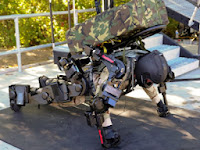
Raytheon XO 2
The technology behind Lockheed Martin's Human Universal Load Carrier, or HULC derives from the Ekso robotic legs. The (incredible) HULC, however, adapted for military use, applies the technology completely differently. Using and onboard microcomputer to correlate its movements with the wearer, it's flexible enough for the wearer to squat and crawl, and powerful enough to lift 200 pounds effortlessly. Lockheed Martin also plans to design similar exoskeletons for industrial use as well as mission-specific operations.

Activelink Power Loader LightCommissioned by the French Directorate General of Armaments, the RB3D Hercule, which looks a bit like a headless android riding piggyback, is a light-weight, lithium-ion battery-powered "collaborative robot." It has been designed to work intuitively, requiring no special training to use. Like the HULC, it is designed to enhance the wearer's endurance and assist with heavy lifting. It can go for 12.5 miles on a single charge, and while it's a bit bulkier than the HULC, it has a slightly better carrying capacity (about 220 lbs). In addition to military operations, the Hercule may prove useful in fire fighting, construction, logistics, and medical applications.

Other than the HULC, the only exoskeleton under development for the US military is Raytheon's second-generation XOS 2. In some ways, it's one of the more impressive robot suits out there. In demonstrations, soldiers have used it to punch through solid wooden blocks. With an actual weight to perceived weight ratio of 17:1, a 100 lbs. crate of supplies would feel like less than 6 lbs., essentially like carrying an empty box. Unfortunately, the XOS 2 currently needs to be tethered to a power source to work. An untethered version is expected to be fully operational by the year 2020.

Not to be left behind, Panasonic, under their affiliate company Activelink, is currently developing the Power Loader Light, a real-life version of the Power Loader from the movie Aliens. Like its movie counterpart, it is designed for industrial and logistics work. Unfortunately, Activelink has abandoned the massive robotic arms of their earlier prototype. In its current form, it seems unlikely that the Power Loader could be used to defeat space monsters, but who knows what the future holds?


Tuesday, April 30, 2013

The Cost of Fire...and How to Bring it Down!

According to the National Fire Protection Association (NFPA), the cost of fire fighting has gone up monumentally over the course of the last thirty years.  Even with numbers being adjusted for general inflation, the cost of fire is 38% higher in 2010 than it was in 1980.

It is estimated that fire costs about $328 billion per year.  That number covers everything from economic loss (such as property damage), to human loss (such as loss of life, medical care, or pain and suffering), to the actual cost of preventing fire (such as fire departments and equipment).  A significant bulk of the costs stem from prevention.

That should leave every fire department questioning what they can do to help their department save money.  So, how can you save money?  And how can you help other departments save money too?

Turnouts
Companies like Fire Dog Services deal in donated turnout gear.  Working with a company like this allows you to acquire newer gear for your department, keeping you up to date with safety regulations, even if you don't quite have the funding to do so.  Donating your older gear to Fire Dog Services can greatly impact the budget of smaller less funded departments!

Fire Equipment
Any fire department will tell you that one of their biggest expenses is their trucks and pumpers.  New vehicles are expensive, but frequent repairs on aging vehicles isn't always much cheaper.  As an alternative to buying a brand new truck, look at a company like Adirondack Fire Equipment.  They buy and sell well-conditioned used emergency service vehicles.  You can assist in the funding of your new vehicle by selling your old one, or upgrade to a newer vehicle by purchasing used.

Technology
When it comes to buying rugged computer equipment most departments deal with a moment of sticker-shock.  By looking to purchase refurbished Panasonic Toughbooks, you can essentially outfit your entire fleet for the cost of purchasing one new unit.

Grants
One of the most underused forms of funding purchases for emergency service agencies is grant funding.  Grants are essentially free funding to assist smaller, financially needy departments with the ability to get the newer equipment that they so desperately need.  And grants are available for practically everything....training, tools, apparatus, turnouts, hoses, and the list goes on-and-on.  Grant writing services are even available for those who aren't quite sure if they can properly write up a grant!

Tuesday, April 10, 2012

Congratulations To Our Newest Win A Toughbook Winner!


HopeHose Humane Co. #1 in Bordentown, NJ was recently presented with a refurbished Panasonic Toughbook CF-19.  The receipt of this Toughbook was through a need-based program offered on a quarterly basis by Bob Johnson’s Computer Stuff in Smyrna, DE.

Chief Pete Sedor submitted a short essay expressing the need of a Toughbook for his department.  Hope Hose Humane Co. #1 was determined as the recipient for this quarter based on the fact that they are a volunteer department that is funded primarily through donations and a yearly allotment from the city of Bordentown These funds are utilized for mandatory purchases such as training, maintenance, and yearly testing of equipment, leaving them little available for additional items to better serve their community.
 
The addition of this Panasonic Toughbook CF-19 will have a significant impact on their department and their service to the community.  The computer can be utilized to store all of the building preplans and emergency contact information that is necessary to have on hand during an emergency response.  At Hope Hose Humane Co. #1, this information is currently being stored in bulky binders that are taking up valuable space in the cabs of their emergency vehicles.  According to Chief Pete Sedor, “A Toughbook would immensely help with space, organization and expansion of valuable information needed at emergency scenes.”

Upon learning that his department had been determined as the award recipient, Chief Pete Sedor expressed his gratitude for, “providing Hope Hose Humane Co. #1 and emergency services everywhere the valuable opportunity to receive equipment and technology to help better serve our communities.”  Per Jodi Quick, Toughbook Sales Manager at Bob Johnson’s Computer Stuff, “This need-based Panasonic Toughbook award program is open to all police, fire, and EMS departments in the U.S.  We look forward to helping other departments better serve their communities.”  For further information on this program, please contact us via email.


Tuesday, April 3, 2012

Toughbook Repairs & Instructional Videos


We've previously reviewed the total cost of ownership of Panasonic Toughbooks.  In that review,  discussed that Panasonic Toughbooks have (on average) a 2.42% failure rate, making them significantly more durable that consumer-line laptops that average an 11-19% failure rate.That 2.42% failure rate means that at some point in time, a very small percentage of Panasonic Toughbooks will have some sort of issue that will need repair.  Of course, these issues can be from a hardware issue or from excessively rough usage by the owner.

Did you know that we also produce instructional repair videos which are posted on your YouTube channel, Toughbook Repair How To's?  The videos span across the semi- and fully-rugged Toughbook models that are still running in service.  They include the CF-52, CF-19, CF-30, CF-29, and CF-28.  These videos encompass common basic repair issues such as how to replace a hard drive and how to replace a keyboard.  They also cover more in-depth repairs including repairing or replacing internal components (like system boards WLAN cards) and the touchscreen.  The videos are very detailed and easy to follow, meaning you don't need to be a computer technician in order to complete the repair.

Worried that your computer technician skills aren't quite good enough to attempt an in-depth repair?  We at Bob Johnson's Computer Stuff also offer repairs and refurbishing of Panasonic Toughbooks.  This process can be as simple as cleaning up your unit or replacing defective hardware.  Contact a representative to learn more about our repairs.

Check out one of our most popular videos, How To Replace The Bezel on a CF-18.

Monday, March 26, 2012

Review: Panasonic Toughbook CF-52

When most people think of Toughbook, their first thoughts are of a CF-30 or CF-19.  After all, that is what Toughbooks are primarily known for...the heavy-duty, fully-rugged, water-resistant laptops utilized by police, fire, and EMS departments throughout the United States.

For those that don't plan on mounting their laptops in their vehicle, but still want something durable, there are semi-rugged Toughbook options.  A popular semi-rugged Toughbook option would be the CF-52.  It has many of the same qualities as the fully-rugged models without the weight or the price-tag.

Casing
The casing of the Panasonic Toughbook CF-52 is similar to that of the fully-rugged models.  It has a magnesium alloy casing that is significantly thicker than that of your standard laptop, which protects it from the accidental bumps and knocks that occur with a laptop placed in a briefcase or laptop bag.

Hard Drive
Like the fully-rugged line, the hard drive is fully protected in the Panasonic Toughbook CF-52.  The caddy surrounds the hard drive with a protective cushion layer which protects that hard drive against sudden movements or bumps, keeping your data safe.

Water and Dust Resistant
Please note that water resistant is not the same as water proof, however, the CF-52 will withstand minor spills or a brief light misting of rain.  All of the ports on the sides of the unit seal of tightly, keeping out dust and liquid spillage.  As for the top of the unit, there is a water resistant plate below the keyboard.  Although you may ruin your keyboard if you spill on it, the motherboard should remain fully functional.
Drop Resistant
Although we do not recommend dropping your Toughbook to test its durability, the CF-52 is drop-rated.  Per Panasonic, the CF-52 is capable of withstanding a one foot drop onto plywood.  This would be roughly the equivalent of dropping your briefcase.  Note that even if damage were to occur to the casing, the previously mentioned hard drive caddy would protect the data on your hard drive.

Weather Resistant
Like other Panasonic Toughbooks, the CF-52 is designed to withstand harsh weather conditions.  It will adequately handle being utilized in both extreme cold and extreme heat.  This is a great option for anyone who might need to travel with their laptop or leave it in a vehicle for extended periods of time.

Bigger Screen
A major design difference between the semi-rugged and fully-rugged lines of Toughbooks is the ability to get a larger display.  The CF-52 comes equipped with a 15" widescreen display, compared to the 13.3" display of the CF-30 and the 10.4" display of the CF-19.

To determine if a semi-rugged laptop is for you, or if you require a fully-rugged one, check out our blogs "What Does Rugged Mean?" and "How To Buy The Right Mobile Computer For Your Department".


Thursday, March 15, 2012

How To Afford New(er) Computer Equipment

Most departments would like to fill their police cruisers and emergency vehicles with the newest and greatest technology available.  However, with how often technology changes and advances, it is nearly impossible to afford the continuous process of upgrading.

We've written several blogs about how to finance your purchases through grants.  However, grant money can be difficult to acquire.  Grant requests must be adequately written, and moneys received from grants are only allowed to be spent on very specific items.  This leaves very little leeway in purchasing if inventory at your vendor changes in the time it takes to get your grant approval and funding.


Another option that tends to be overlooked quite frequently is buy back or trade-in.  At Bob Johnson's Computer Stuff we will happily buy back your previously purchased equipment from us when you are ready to upgrade to newer Toughbooks.  If you didn't purchase your current computers or mobile data terminals from us, that's fine too...we will happily take them for trade-in value on the purchase of Toughbooks.

Our buy back/trade-in program is only the beginning of the savings when you purchase from us.  As a refurbishd Panasonic Toughbook dealer, the units that we sell are generally 50-75% less than the cost of new units.  If you are worried about purchasing a "used" Toughbook, you shouldn't.  Used Toughbooks are fully refurbished and are often in like-new condition.  All refurbished units at Bob Johnson's Computer Stuff come fully equipped with a limited lifetime warranty (something a new Panasonic Toughbook does not).  

By combining your trade-in units with the purchase of a refurbished unit, you have the ability to double, triple, or even quadruple the number of units you are able to purchase for the same price!

If you would like more information on our trade-in program or the cost of our refurbished Toughbooks please don't hesitate to contact us.  We can be reached phone at 877-202-7788 or email.  


Tuesday, February 21, 2012

Toughbooks Are Tough

In the past few months we've written quite a few blogs about the toughness and durability of Panasonic Toughbooks.  Generally these blogs center around the factory testing and how well the Toughbooks hold up to water, heat, cold, and drops.  These tests all center around things that Panasonic expects to happen to a laptop, as people spill drinks on their keyboard, leave it in their vehicle exposing it to temperature fluctuations, and sometimes knock it off the table.  But, how well does a Toughbook hold up to things Panasonic doesn't expect to happen?

Can It Take A Bullet?
Yes!  Back in 2003, a Panasonic Toughbook CF-M34 actually saved the life of a US military member in the 82nd Airborne Division.  The soldier was in Iraq when he came under fire.  He was carrying the Panasonic Toughbook in his backpack.  A bullet struck his backpack, passed through the screen and the keyboard of the Toughbook, and lodged in the solid magnesium-alloy casing...saving his life.  As if that isn't enough, the unit still functioned...minus the screen and keyboard of course.

Forbes magazine also did a little testing of the Panasonic Toughbook against firearms as well.  They took the laptop to the Jackson Arms firing range in South San Francisco to shoot it with a Ruger Mark III .22 pistol from 15 yards.  They removed the battery to minimize the mess.  They aimed, and put a bullet through the laptop. Then they booted it up, and theywere able to log in. The screen had a hole in it, but was still usable. 

Can It Survive A Fire?
Yes!  There have been multiple reports of Panasonic Toughbooks surviving a vehicle fire.  A recent one occurred with St. James Ambulance in Missouri.  In February 2011, the St. James Ambulance District was called to a motor vehicle accident. While en route to the scene, they experienced some mechanical issues that required the driver to pull to the side of the road. At that time, they realized that there was a small fire under the vehicle.  That fire quickly spread to the engine and passenger compartments, where the Panasonic Toughbook CF-19 was located.  
After the fire was extinguished, one of the crew members obtained the Toughbook from the ambulance.  After letting the water drain, he hit the power button to find the computer was fully functional with a few minor exceptions.  “The exterior was melted and the case was cracked in several places,” stated Bryan Lambeth, EMS supervisor and paramedic for St. James Ambulance District. “I truly didn’t have high hopes, but I hit the power button and the computer fired right up!”

Friday, February 3, 2012

How To Buy The Right Mobile Computer For Your Department

Finally acquiring funding approval and/or grant approval is a major step in purchasing mobile data terminals, such as Panasonic Toughbooks.  For many departments, it's probably the part of the purchasing process that takes the longest amount of time.  Once you get the okay to start browsing vendors and acquiring quotations, how do you determine what to buy?  To point you in the right direction, here are a few tips:


  1. Learn the specifications of your software.  Whether you are buying new software or continuing to use the same programs, you need to know what type of hardware requirements it has.  Pay particular attention to processor speeds, minimum memory/RAM, and required hard drive space.  There is nothing worse then buying computers only to find out that they can't do what you needed them to.
  2. Don't forget about peripherals and software that you want to get later.  Are you thinking about adding an automated license plate recognition system in a year or two?  Get some general specification information from various vendors, and then make sure that what you are purchasing will be able to handle the add on.
  3. Determine exactly what you plan to use them for.  Are you looking to mount them in a vehicle?  Do you plan to use them to capture signatures?  Will you be doing a lot of typing?  Are you going to integrate your lights and sirens into the computer system?  Knowing the answers to questions such as these can sway you in the direction of just what Toughbook you should purchase.  For example:
    --If you are looking to mount the Toughbooks in a vehicle, you are going to want to stick with a fully-rugged model, such as a CF-30, as it will outperform a semi-rugged model.
    --If you plan to capture signatures on it, you might want to lean towards a tablet unit, such as the CF-19, as it will lay flay making signing easier.
    --If you plan to do a lot of typing, you might want to stay away from a tablet unit since they do not have a standard sized keyboard.
    --If you plan to integrate lights, you definitely want to go with a touchscreen unit, as it is easier and safer for officers to operate those systems on the go.
  4. Think about how long you need it to last.  Are you in the process of upgrading from a system that was installed back in 1992?  Is it likely that the units you are purchasing are going to need to last you another ten years?  You might want to look into purchasing a newer model of computer.  A newer (not necessarily new) model will have lower usage hours and will be compatible with newer hardware and software for a longer period of time.
  5. Get your money's worth.  In a previous blog article we talked about overall cost of ownership.  Be sure to take into account the failure rate and time that the unit you are purchasing will be out of service.  In that blog, it is explained that Toughbooks are actually more cost efficient that other brands of laptops for emergency services usage (including the supposedly "rugged" versions of Dell) as they are a higher quality unit with a significantly lower failure rate.
  6. Maximize your funding.  Many departments overlook refurbished Toughbooks, as they look at them at being used and therefore of a lesser quality.  When in actuality, refurbished Toughbooks are often in like-new condition.  Throw in a great warranty, and it's like buying a new unit without the hefty price tag.  Prices of refurbished units are generally 50-75% less than the cost of new units.  If your funding is sparse or you need a lot of units, you should look into purchasing a refurbished unit.  Why purchase one new Toughbook for $3,500+ when you can get three or more for the same price?

Wednesday, February 1, 2012

How Tough are Toughbooks?

We've written numerous posts about how Panasonic Toughbook's are rugged, how they are significantly better than other brands of (supposedly) rugged computers, and even about some of the types of abuse that they can endure.

Have you ever wondered why?  Toughbooks go through extensive testing in the development stage.  Just a few of the tests that they endure are a water spray test, vibration tests, hot/cold weather tests, and hinge tests.  Panasonic has rigorous standards in regards to testing.  Units need to exceed the military specifications of these tests, meaning you are purchasing a laptop that will hold up to significant wear, tear, and flat-out abuse.

To see an inside look at some of Panasonic's testing facilities check out the following video.


As if Panasonic's testing weren't enough, many Toughbook owners feel the need to really put their Toughbook to the test.  A quick browse on YouTube will show you all of obscure testing methods that have been utilized.  However, the following video stood out to us, as it is one of the view videos where a Panasonic Toughbook has been immersed in water and blown-up...and (of course) it still worked like new afterwards.


Obviously, our refurbishing and repair technicians do not recommend dunking your Toughbook in water, blowing it up, feeding it to a tiger, or running it over with a car on purpose.  However, accidents happen, so why not have a computer that is prepared to handle them?

Monday, January 30, 2012

Did You Know Toughbooks Are Cheaper Than Commercial Laptops?

Although at first glance it might not seem like it, purchasing a Panasonic Toughbook is actually a cheaper option than purchasing a standard commercial laptop.  The initial purchase price of a Panasonic Toughbook will be higher, however, the total cost of ownership is significantly cheaper!  Keep in mind that initial costs can be decreased by purchasing a refurbished Toughbook instead of a new one.

When officers are equipped with mobile computers, employees can be productive anywhere, anytime. But most portable computers are not designed for work outside the office and are at a significantly greater risk of being damaged. Damage can occur in a number of ways: drops, spills, dirt, dust, extreme temperatures and vibration. If a computer fails, there can be significant repercussions. Even a brief period of downtime has a ripple effect that can impact productivity.


Most mobile computers are not built with the outside world in mind. In fact, industry research indicates that average annual failure rates are significantly higher for ordinary laptop deployments.  When downtime and repairs are figured into the lifetime costs of ordinary commercial laptops, the ultimate price of those laptops increases substantially.


Designed for unparalleled performance and durability, Panasonic Toughbook computers are the mobile professional's best defense against downtime and data loss. Toughbook rugged computers are built to withstand drops, liquid spills and falling objects-the three leading causes of laptop damage. With superior protection for components most prone to damage, Toughbook computers deliver maximum uptime and productivity at a lower total cost of ownership.

PCS Mobile reported an industry average failure rate of 21.0%. Panasonic's service records (as of September, 2009, for units in and out of warranty) show an average annual failure rate of only 2.99% for Toughbook mobile computers.
A comparison of the data presented in the below Venture Development Corporation (VDC) chart highlights the difference in reliability between rugged and commercial-grade PC's. By the third year, the number of commercial-grade units that need to be replaced is over 60% more than rugged units.
Compared to commercial grade computers, Panasonic Toughbook mobile computers average better than 15% lower on total cost of ownership, annually. Over the life of a typical mobile computer, that adds up to significant savings, plus a better overall user experience.


Information Retrieved from Panasonic


Wednesday, January 25, 2012

Smyrna Police Dept (DE) Receives Donated Toughbook

Chief Bordley receiving a CF-30 from Bob & Marisa Johnson of Bob Johnson's Computer Stuff

Today we made a donation to our town of Smyrna, Delaware.  We donated a Panasonic Toughbook CF-30 to Chief Wil Bordley and the Smyrna Police Department.


We are happy to know that this computer will be put to good use.  The Smyrna Police Department has recently renovated one of their undercover vehicles to make it usable as a full-time patrol vehicle.  The CF-30 that we donated is going to be placed in that vehicle as a mobile data terminal.  The Toughbook can then be used to run vehicle license plates and for various other police activities.  Having a Toughbook in the patrol vehicle allows officers to have access to more information, making them more efficient and making their job a little easier.


Would you like a Toughbook for your department?  Visit our Facebook page and enter to win one!  This quarter we are giving away a CF-19 to a deserving fire, police, or EMS department!

Wednesday, January 4, 2012

Congrats To Our Winner!!!!


Bob Johnson's Computer Stuff wants to wish a big CONGRATULATIONS to Chief Shawn Tray of West Mahanoy Township Police Department in Shenandoah, PA!  Chief Tray's short essay won the West Mahanoy Township Police Department a FREE Panasonic Toughbook CF-30!

We received multiple submissions from various police departments throughout the country.  However, West Mahanoy Township stood out.  Unlike other departments that are currently making do with older equipment, West Mahanoy Township currently has no equipment.  They are a very small community, which leaves them with a minimal budget to fund their small police force.  We felt that providing them with a Panasonic Toughbook would significantly increase their productivity in the field which would in turn increase the safety of the local community for their residents.  Upon learning that their department was the winner of our contest Chief Tray was highly appreciative and said, "it will be a great help to the department."

His Essay:
 With the budget crunch our township is facing this item would be a great benefit to the department and the effort we make to keep the community safe.  As of now our department has not been able to utilize the advanced technology that’s available.  Our patrol vehicles are not equipped with computers or an in car camera system.  The lack of a laptop severely limits the number of registration and licenses we are able to check, and the number of criminal history's we are able to get via roadside.  With not having this capability we are missing out on information that would lead to more arrest.  It also takes time away from officers being out on the road, as we must come back to the station and use our 11-year-old computer to access J-Net, and complete incidents.  Our police department covers over 16 square miles and serves over 3,000 residents.  Unfortunately each year there just has not been money left over in the budget to invest into new items.  Our crime has continued to rise over the last two years, with criminal arrest increasing nearly 15%.  This includes arrest for marijuana grow operation, a methamphetamine lab in a motel room and execution of numerous search warrants, where illegal narcotics were seized.  Officers have seized over the past two years, nearly six pounds of marijuana, 150 packets of heroin, over three grams of cocaine.  Along with ecstasy pills, methamphetamine, and prescription drugs.  I know to some departments this may not seem like a lot, but from having zero seizures prior to two years ago, to being a proactive police department, is a step in the right direction.  I assure you this item would be used to the fullest and greatly appreciated by our department.  Thank you for your time and consideration.
Bob presenting the CF-30 to Chief Tray


Enter To Win:
If you missed this contest, you can enter our next contest which will be running through March 31, 2012.  Visit our Facebook page to enter to win a Panasonic Toughbook CF-19 for your department!  The contest is open to fire, police, and EMS departments!

Tuesday, January 3, 2012

Panasonic Toughbooks: Are They Worth The Money

Panasonic Toughbooks tend to be one the most sought after computers for use in the field, particularly for those in first responder fields.  However, many departments are put off by the sheer cost of a Toughbook, as they wonder "is it really worth the extra money?" or "can't a regular laptop do the job?".  To answer those questions:

  • Yes, a Panasonic Toughbook is worth the extra money.  For those departments that don't have the excess funds to purchase them, there are always refurbished Toughbooks and grant funding options available.
  • No, a regular laptop cannot do the job.  While it will be able to run the software and will work when it is initially installed in your vehicles, it will fail...a lot.  The most common issues with standard retail/business line laptops being utilized in a moving vehicle include hard drive failures (due to shock vibrations), hinge failure (again due to shock, vibration, and excess stress on the hinges), and screen failures (due to cables vibrating loose or to significant weather fluctuations).
So, just why is the Panasonic Toughbook worth the extra money?  Simply put, it will last longer as it has a lower failure rate and is engineered specifically for the harsh environments that you will be utilizing it in on a daily basis.

Water Resistant
One of the most common types of spillage on a computer tend to be from the user.  Generally the spillage comes in the form of water, soda, or coffee.  While most computers would suffer a severe electrical shortage in the system board, that is not an issue with the Panasonic Toughbook.  All of the units come standard with a metal plate underneath the keyboard, which keeps any liquid from reaching the system board.  The fully-rugged models of Toughbooks will withstand way more spillage than your average cup of coffee.  Water resistance testing on a Toughbook includes a full thirty minutes of blowing rain 70 mph wind gusts with an average rainfall of 5.8" per hour.  What could simulate a heavy rainfall more than a high-pressure car wash?


Drop Resistant:
Although most people don't set out to purposely drop their laptop, it does happen.  Usually a dropped laptop results in a broken LCD screen or complete hard drive failure.  Panasonic Toughbooks, however, are tested to ensure that they can survive falls up to six feet onto a concrete surface.  Considering the fact that most drops occur from a vehicle, falling from a table, or from while being carried, it is highly unlikely that you will drop it from higher than six feet.  Although it is tested and approved for drops, please don't abuse your Toughbook like this on purpose...


Vibration & Shock Resistant:
Most Toughbooks are used in the field.  A great deal of them are mounted inside of a vehicle.  The Toughbook is designed and tested to withstand the regular vibrations of a vehicle as well as sudden high-force impacts to the protective casing.  Just how shock and vibration resistant are they?  If they can handle this abuse, they can definitely handle being mounted in your vehicle...

Temperature Resistant:
We've previously mentioned how a well a Toughbook can stand up to rain.  What about other significant weather?  A Toughbook that is permanently mounted in a vehicle can see significant temperature variations throughout the year (and depending on the season, even the day).  Lets use a drastic example...Minneapolis, Minnesota's average yearly temperatures range from the low teens in the winter to the upper nineties in the summer.  A standard laptop would never be able to function in the drastic cold of a Minnesota winter.  However, a Panasonic Toughbook is tested to fully function in a temperature range from as low as -20°F to as high as 140°F.  As if that weren't enough, a non-operations Toughbook (such as being powered down or in storage) will still fully function after being exposed to temperatures as low as -60°F or as high as 160°F.

As if that weren't enough, Panasonic Toughbooks are also:

  • Particle Resistant - to items such as dirt, dust, and sand
  • Air-Pressure Resistant - the unit will fully function at 15,000 feet
  • Humidity Resistant - fully functional at up to a constant 95% humidity
  • EMI Resistant - tolerates electromagnetic interference
  • UL 1604 Compliant - safely able to use around flammable and explosive materials
There are multiple stories and testimonials available showing how Toughbooks were the only computers that held up to harsh environments for various fields of use.


Monday, December 19, 2011

Panasonic Toughbook CF-74 Review

When most people think of Panasonic Toughbooks, they think of fully-ruggedized machines such as the CF-30 or the CF-29.  However, Panasonic also makes an entire line of semi-ruggedized machines such as the CF-74.  These machines are not quite built to withstand the same abuse as the fully-ruggedized machines, such as the constant vibration of being mounted in a vehicle.  However, they are built to withstand significantly more abuse than a standard business laptop.  The Panasonic Toughbook CF-74 is designed for professionals on-the-go.

The Panasonic Toughbook CF-74 has some of the ruggedized features that most people consider standard in a Toughbook.

  • Shock Mounted Hard Drive - Keep your data safe while your laptop case is being tossed around during travel
  • Spill-Resistant Keyboard - No need to worry about accidental late night coffee spills, the protective plate will keep any liquid from reaching your system board and causing disastrous damage to your machine
  • Daylight Readable Screen - Although outdoor viewing isn't too important for boardroom professionals, it is a must for professionals whose jobs keep them in the outdoors
  • Magnesium Alloy Case & Handle - This Toughbook is built with a material that is twenty times stronger than a standard business laptop

The Panasonic Toughbook CF-74 has also taken some major technological leaps from the fully-rugged machines that most Toughbook users are accustomed to.

  •  Intel Core 2 Duo Processor - Faster processing speeds than most fully and semi-rugged Toughbooks currently on the market
  • Expanded RAM - Based on the operating system installed, the CF-74 can support up to 4 Gig of RAM
  • Windows 7 Ready - One of a few refurbished models currently able to fully utilize the benefits of Windows 7
  • Light-weight - Weighing in at only 5.9 pounds, this laptop is easy to transport to various meetings
Like choosing any laptop, you have to weigh the options of what you need the most and where you plan to use it.  The Panasonic Toughbook CF-74 Ideal for mobile executives or any business person who is constantly on-the-go.